You are browsing the archive for Apple.

Talkin’ ’Bout i(Pod) Generation

February 11, 2011 in Articles

San Francisco Classical Voice had a great article about the iPod Generation
“The iPod (and, by extension, iTunes) not only revolutionized the world’s listening habits early in the last decade, expanding the sheer variety of music people listen to; it also changed the manner in which people think of and hear music. It’s true that not everyone has an iPod (or an iPhone or an MP3 player of some sort), but virtually everyone understands its significance. The device holds music that fits in your pocket, offering you an easy way to listen to vastly different things, even a way to juxtapose and to mash-up music or sounds that would normally seem as far apart as a Formula One racecar and a pony.

The most significant musical inventions from Apple’s iPod (and, by extension, iTunes) are the shuffle, the mashup, and the playlist.”

I think the author left out Music Hoarding…..I think that is a huge contribution to music. You now don’t have to look for an album in your collection, it’s there. And as your collection grows, it is invaluable to hear 20 versions of “Impressions” or “Giant Steps”. Playlists are nice, the mashup can be fun, and shuffling has its place but hoarding is where it is at. That is the wondrous thing Steve Jobs and the iPod brought us.

Thanks Steve……now lets create a playlist of a mashup of everything that has the word blues in it……ahhh, 5,568 songs? I guess we shall be using the shuffle on this…..

Best Practices For Preparing Music for an iPad

January 2, 2011 in Articles, Sheet Music

I spent most of new years day going through binders and either scanning or shredding (sometimes both) music I have. I was amazed at how many binders of things I had, and a LOT of it consisted of my II-V patterns and various exercises I wrote for myself.

Anyhow, if I had the finale file to something I had in the binder, I shredded the paper version and proceeded to tweak the finale file to better take advantage of the iPad. Here is what I learned.

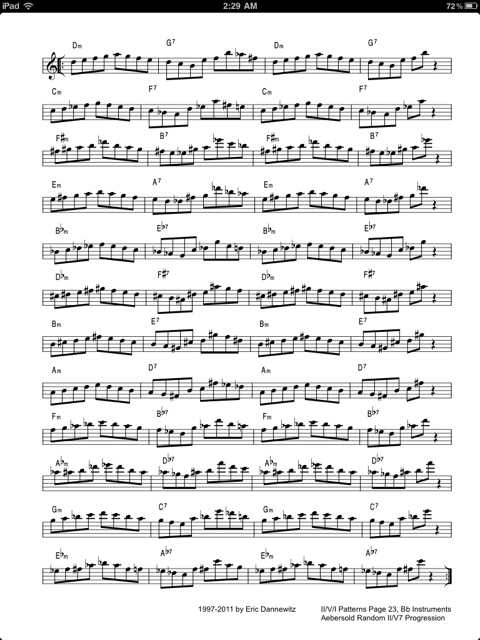
First, you can make the margins practically nothing. In one version of my II-V patterns I have it formatted for a double sided printer so whatever side the holes are to be on, it is 0.5″ from the end of the page on the right and 0.75 on the left (to allow for holes). On an iPad, you can set that to 0.1 all around. The results are quite stunning.

Standard Page with 0.5 Margins

Page with 0.1 Margins on Right and Left

Second, I was able to enlarge the size of the music with 0.1 margins. The result is a page that takes advantage of the iPad’s display, and is easier to read than the pain Jane dumping a standard page to PDF to iPad. So, a note to all you people providing stuff out on the web and who are iPad or Tablet enthusiasts…..you need to reformat your PDFs. It doesn’t take much, and in Finale it was simply making a new Part and then tweaking the layout. About 3 to 5 minutes of work for something that looks a lot better.

Here are the patterns formatted for iPad. I will be doing a mass update of files to include iPad versions. Enjoy.

  Random II-V Patterns - Bb (iPad) (4.9 MiB, 48 hits)
You do not have permission to download this file.

iPad in Education

December 14, 2010 in Articles

From the Santa Cruz Sentinel:
“Before, during and even between classes at Hillbrook School this fall, seventh-graders have been spotted on the Los Gatos campus, sometimes burbling Spanish or Mandarin phrases into the glowing screen in their hands, other times staring into it like a looking glass,” Bruce Newman reports for The Mercury News.

“iPads — the Apple of almost every adolescent’s eye — are being provided to students at several Bay Area public and private schools this year, including Hillbrook, which claims to be the only K-8 school in America using tablet computers in class and sending them home,” Newman reports. “This has led to a lot of 12-year-olds swanning around the wooded hillside campus, talking to their iPads.”

It just makes sense. It’s cheaper, more “green”, and more efficient. Now imagine having all your music books in an iPad. Or all that Lit and Analysis stuff accessible instantly. Or having some great ear training Apps to help with sight singing. Soon……it’s happening as we speak…..

Best Practices To Scan Old Books into PDFs

December 12, 2010 in Articles

Yes, the iPad is amazing. Ok, sure, there are some other makers coming out with devices too. Regardless of what you get, you are probably at some point going to want to convert some of your tattered books into digital format. But how? What should I use?

Fear not, here are some guidelines to do it as I’ve converted quite a few of my old books that were falling apart into excellent PDFs. First, you need a scanner. A sheet feed scanner on something like a Brother 7340. I used a Brother 7420 myself, and it works great. Good Macintosh support. You could use a lot of other different solutions as well, but you really need to have a sheetfeeder scanner (ie: you can put 20+ pages on it and let it do it’s stuff).

Second, you need some sort of paper cutter to cut the bindings off, and any books that are oversized (like Rubank) need to be trimmed a little to fit in the scanner’s sheetfeeder. You can use scissors I suppose, but a paper cutter is easier, cleaner, and does it better.

For scanning, I’ve found that 300dpi B&W uncompressed TIFF is the way to go. I don’t do JPG or compressed TIFF because I am going to let the PDF part of the process do all the compression when I’m ready. I put in a stack of pages in the sheet feeder, and have it go. When its done, then I put the other side through the scanner. When that is all done, I go through the scans and number them (01…09….20….etc) and make sure that the scanner didn’t take two or more pages in by mistake (it will happen) and to see that they pages have all the stuff on the page (as in nothing was cut off during the scan). The cover and back I’ll generally use the flatbed scanner on the unit to make color scans. The covers are usually thicker anyways and don’t go through the feeder well (if at all).

Ok, so, now you have all these TIFFs, I use Adobe Acrobat to assemble them (“Combine Files into PDF”). The middle setting (lower right filesize) is the setting I use, into a Single PDF file. You also need to make sure the pages are in order then go.

Acrobat will then assemble all the files together, and display the result. Now, the next thing to do, which is why I use Acrobat, is to use the Tools->Recognize Text. Why you say? Well, it does OCR any text in the PDF, which is helpful if you need to search something, but it also will do things like straighten any crooked pages and stuff. Little things that will make your PDF look great. So run it. When it is done, then do an Apple-D and type in info for the PDF like the title, author, some key words. Then save.

Done! Now you have a nice digital copy for yourself. It is really great using the iPad to practice with, it remembers where you were in each PDF, and you can make bookmarks (which can transfer to your computer), etc. Notes. Great stuff. Here is an example page

The iPad as a….WTF…..

December 10, 2010 in Videos

Honestly, this is lame……I’m all for things iPad, I love the iPad, but using it for this is just…..stupid and hokey.

However, Gorillaz releasing an album that they did on an iPad for free is something that I like.

Wither and die sheet music/music stands?

November 4, 2010 in Articles

There are already several apps for the iPad for viewing sheet music PDFs, including apples iBooks. It makes sense, the iPad is just about the right size for viewing a page of music.

Now, there is a mount for iPads.

$39.95. Now we just need a Bluetooth foot peddle page turner…..for that price….

And for saxophone players, if you use this with a microphone stand, this also solves the problem of how to hear yourself….as in the iPad should provide some reflection of the sound back at you if you have it just above the bell. Wonder if that would mess with the microphone capturing one’s sound correctly…..I should get one and try it out….

UPDATE: Oh, the foot switch is coming!

Apple Launches Ping

September 6, 2010 in Articles

Well, seems like the new version of iTunes has some social functions now. Though Ping is newly born, some people, like eternal Apple hater Peter Kirn seem to have already written it off. That is a huge mistake. Kirn also has said that the iPad is a failure as well. Heck, he thinks that because Apple has not allowed Flash on the iPhone/iPad….that the iPad isn’t OPEN SOURCE and it’s not a Mac. Seems to really have hurt the iPad sales…..NOT. Ok, so lets put away Kirn’s ramblings and assumptions….he sometimes publishes things worth reading when he isn’t pushing his Open Source dementia upon us.

Ping. I think it is very interesting. A highly focused Social integration about something we all have in common. Much better than Facebook. Geeze, Facebook recommends friends who I have NOTHING in common with…..or friends of friends which it assumes will be friends of mine. I think not. Ping on the other hand, narrows its focus to what types of music you like. Though it only lets you select THREE Genres of music, I expect that at some point it will have some sort of Genius type feature which will scan your library and recommend things from that. Genius in iTunes works fairly well……..not 100% but it comes up with some interesting stuff sometimes. What if Genius and Ping worked together, so Genius started looking at what your Friends are listening to, and perhaps recommending stuff based on that? And vice versa? Ping is now in existence, and I think we will be seeing this shortly. I’d expect by December we will have gone through a couple of iTunes versions, probably up to 10.5. Anyone remember how the App store or the iPhone OS started? Apple tip toes at first……so expect things to get interesting soon.

Ping displays on your profile Albums that you Like, Rate, Review or Purchase. Now, iTunes won’t let you review an Album unless you buy it. However, you can Rate, Like and Post it. Rating an album, even though you didn’t buy it from iTunes, shows up on your Ping profile. Liking an Album does as well, and Posting it lets you put a message about the Album, like “Get the track Doctor Sax off this…..Michael Brecker tears it up!”.

The problem is that there is way to Ping things that are not in iTunes. So that bootleg recording of Brecker Brothers or that hot Japanese Fusion band……if they are NOT in iTunes, then you can’t Ping them. Nor can you ping just individual songs off Albums. Nor do your Ratings of Songs that are in your iTunes Library show up on Ping. Now, I think these will be showing up in Ping real soon. It makes a LOT of sense to do this (if the user wants to).

In all, Ping isn’t Facebook. I think that is a GOOD thing. Facebook is just stupid now……news outlets, companies, everyone is using it. And the result is that you end up not caring about what your “friends” are doing. Or you just end up playing the games there. I think what Apple is trying to do with Ping is, like it has done before, narrow it’s focus on something and make it amazing. I think Apple can and will be doing some interesting/amazing stuff with Ping shortly.

I have to wonder though…..in a long term game plan, what if Apple has been watching Facebook, and sees some things that it thinks it can do better, and puts that into it’s Mobileme? I mean, I think me.com could be an amazing Social site that, if it took the good parts of Facebook, and tied it into iOS, GameCenter and me.com……that would be pretty interesting….

Anyhow, if you are on Ping, follow me

iPad Sheet Music Page Changer

July 19, 2010 in News, Videos

From Engadget:
“If you carry your sheet music in a laptop, AirTurn’s got a USB dongle for that, but if you’ve migrated your musical cues to an certain slate, never fear, Bluetooth is on the way. The AirTurn BT-105 will bring the company’s page turning technology to iPad, using a transmitter that attaches to standard professional footswitches, allowing you to turn full pages and half pages of sheet music while keeping hands firmly affixed to your instrument. Though there’s no word on price, we imagine it’ll cost close to the existing 2.4GHz version, which runs from $40 for a dongle to $100 for a package with two Boss pedals, and when it surfaces in Q4 of this year, we’re hoping it will extend bicycling input to all the other wild and crazy apps you dream up. PR and video after the break. “

Opens up a LOT of doors. For what it is worth, I have put a lot of stuff I practice on to my iPad, and it works great.

Band-in-a-Box 2010.5 – Mac

July 11, 2010 in Articles

PGMusic just released Band In A Box 2010.5 for the Mac. Improvements? Yes, several. Here are a few that I think are noteworthy:

  • Styles can now be made that are set to use Half-Time and Double-Time RealTracks. For example, you can make a Jazz Ballad style (tempo 65) that uses a Sax Soloist at tempo 140 (playing double time).
  • For RealTracks, many Jazz comping styles now play triads (instead of 7ths) when simple triads are entered, instead of “jazzing them up” to 7ths chords (e.g. Guitar: Freddie, Wes Piano: Some Jazz. All Stride, Rehearsal). If you prefer this “the old way”, where triads are automatically “jazzed up” when comping using Jazz RealTracks, then you can set the Prefs-Realtracks settings option to force 7ths for triads.

Plus, you get a bunch more RealTracks. One of the Paks comes with some B3, and other has some excellent Jazz Guitar.

Is it worth the money? Yes, I think so. It is a great tool for musicians who want to practice 50 choruses of soloing…..at whatever speed……in whatever style……in whatever key. Or perhaps you’ve like to figure out some chords for a song you were working on? Done. BinaB can help you there. Or maybe figure out what chords were played in a song? Yep, it can help you there too. So many uses for this program…..it should really be a REQUIREMENT for a Musician to own it.

UPDATE: A few of the RealTrack Saxophone tracks are Eric Marienthal. How cool is that???

Peterson iStrobe is now $0.99

June 15, 2010 in News

By far my favorite tuner App, now for a buck.

“For a limited time, we have reduced our price on iStroboSoft to 99 cents! No promotion code needed. Visit the App Store to purchase.

Peterson Strobe Tuners popular StroboSoft tuning application for the iPod touch and iPhone. iStroboSoft™ offers the unmatched accuracy of a mechanical strobe tuner for the highest degree of precision available in a software tuning application.
Plug in and tune your electrics and acoustics quickly and easily with 1/10th cent accuracy. (External mic required for iPod touch.)

Peterson Tuners has offered tuning solutions for over 60 years and is the only company specializing in hardware and software tuning products for all levels of musicians.”

iPad Steel Drums

May 26, 2010 in Videos

Ok, I’m still waiting for the Coltrane or Brecker App…..but this is kind of cool.

Wind Controller+TouchOSC+PureData=Cool

March 11, 2010 in Articles, Videos

Ok, now this guy is rocking technology. He’s using a Yamaha WX 5, TouchOSC and an open source program called PureData. Just watching this opens up a LOT of interesting ideas. Like using the TouchOSC to control loops, or change patches, or apply filters, or…….the things are endlessly possible.

Interview with the creator of the Apple startup sound

March 1, 2010 in Articles, Videos

TUAW had a great article last week. An interview with the guy who created the startup sound on Macs, Jim Reekes.

It’s amazing the amount of math, thought and stuff that went into this. Long live the Cmajor startup sound.

The Apple iPad…..Revolution

January 31, 2010 in Articles

Ok, so, unless you have been living in a Cave, you know that there was a great event held on Wednesday. Something all the media covered. Something everyone was waiting for with baited breath. Steve Jobs announced the fabled Apple Tablet. (And some guy named Obuma was doing some standup comedy later in the evening as well).

A lot of Gadget people were bemoaning the lack of this or that. No camera (front or rear), no USB, no HDMI, no Verizon, no Multitasking, no FLASH. Waaa! Sadly, these people are missing the point. It does need to have these things and was designed not to (except maybe the camera…rumors are that there was a prototype version that had one, and the software seems to have hooks for them).

So, what does this mean? And what does this mean for musicians. Can start scanning all our books into the computer? Can we ditch that lame electronic music things like this, this and this? Well, for traditional musicians, I think that scanning your music is a music regardless of what you plan on viewing it on. It might sound like a waste of time, but when you can’t find that book of etudes by so and so that you know you have but don’t know what happened to it….and that it is out of print. Yeah, you’ll be happy that you had the foresight to scan a copy for your archive. Now, viewing music that was made for 8 1/2″ by 11″ pieces of paper on a 9.56″ x 7.47″ device (slightly smaller actual viewing area)? Dunno. Obviously the music would need to be scaled down. Would that make it unreadable then? Dunno. However, if the music is formatted for that size, it would be no problem. Perhaps some witty programmer will design a program that will slice up music PDFs and make them more viewable. I for one plan on offering up iPad versions of stuff here. So, people with iPad can practice the tomb of II/V patterns, or Brecker solos, or whatever.

I think the bigger impact is going to be the cool apps for this. If you have an iPhone/iTouch, you already know all the handy apps out there for it. Now, increase the screen size 3 times and make it faster……can we say mixing applications? Slowdown apps? Multitrack recording device? Practice tool? Tuner? Hmmm….

Want better Relative Pitch? There’s an App for that.

January 12, 2010 in Articles

Yes, the iPhone/iTouch is amazing. 100,000+ Apps. A lot for free. There are a few diamonds in the ruff, and this one is looking like another find.

RelativePitch is an an iTouch/iPhone app that will drill you on intervals. There is a lite version of it as well. The interface is OK, but I have a few complaints about it. The application does not, at least in the lite version, allow you to vary the root note. Maybe the full version does this, I dunno. Second, the intervals are always UP, as in root then the note above. Down would be a great thing to have in this app as well. Perhaps the full version does it. It would be simple enough to add in an update.

The price? $7.99. Forget that. If the developer knocked it down to $1.99, maybe. You’d be better off searching the web for various free trainers, like http://www.trainear.com/. Hopefully someone will do a better version for the iTouch/iPhone soon. Or a cheaper version. $7.99. Come on people!