 I think I have seen the best case ever.
And David Freeman has a modified one for EWI. Awesome.
I’d love to have a one of these that fit Alto, flute, piccolo, clarinet, curved soprano, and oboe. Or one that was just for curved soprano, flute, piccolo, clarinet and oboe. It would be great if they had build your own case combinations.
UPDATE: I inquired about getting a case for alto, flute, curved soprano, clarinet and piccolo. Sadly, they do not have such a combination. To get such a case made, it would be $150 per additional instrument. So an extra $450 on top of the $450. Plus shipping. Plus tax. Ouch. considering the cases only cost $250 apiece…..that is a lot. It looks like a great case, but…..that is a lot of money for a case.
Category: Articles
The MPV Hub is free educational resource for Mac users
This is kind of old, but it’s an awesome site (was cleaning out things I flagged in Google Reeder)
The MPV Hub is free educational resource for Mac users:
macProVideo.com, an online education company specializing in tutorial-videos for Mac users, has launched a new educational portal called The MPV Hub (http://www.macprovideo.com/hub/).
It’s a free resource developed for the Mac creative community. You can use the MPV Hub to find written articles about how to use software, short tutorial-video tips & tricks, interviews with industry experts, product reviews, and other article.
(Via MacMinute)
Music Notation and Music Education Software News | MakeMusic, Inc.
Music Notation and Music Education Software News | MakeMusic, Inc.:
Minneapolis – November 12, 2012 – MakeMusic, Inc. (NASDAQ: MMUS) today announced the upcoming release of an iPad version of SmartMusic, the interactive practice software, in the spring of 2013. The app will be previewed to the public at the New York State School Music Association Winter Conference, November 29 – December 2, 2012, and The Midwest Clinic Annual Conference, December 19 – 22, 2012.
(Via www.makemusic.com)
MakeMusic should have this out in the Spring of 2012, not 2013. And hopefully it should run on ALL iPads (including the original) since Apple’s Garageband still runs on the original iPad (and it runs quite well actually).
Recording Saxophone in Logic 9
Since leaving ProTools, I had to redo my default recording presets in Logic. Here is how I currently have it set up. First, I record everything at 96Khz. Why? Because I can. I think it sounds better too. More open maybe? I dunno.
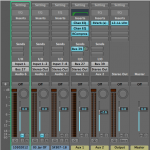
Here is a picture of my channel setups. The first track is the track I am recording to (input 1). I have the output bussed to Aux 1 on Bus 27 (could be any bus, it doesn’t matter). This Aux will have all the plugins and EQ setting setup on it. So, if I do another track, I don’t have to recreate everything.
This Aux is also mono, keeping it similar to the source material. Also, this Aux is sending some of it’s signal to Aux 2, which is for reverb. You could add reverb on this aux strip, but a this is sort of a trick I learned while mixing a CD. You have both the source and the reverb separate.
Next, lets look at what plugins I have on the Aux strip….
Read More “Recording Saxophone in Logic 9” »
Forum Changes
Yes, there is/was a Forum on jazz-sax. Well, whatever was there is now been replaced.
Why?
I was using something called Simple:Press for WordPress. However, they are now a paid thing (they had been free for a long time) if you want the plugins and stuff. Plus, I never really liked how it worked and looked.
So I blew it up, and replaced it with BBPress. We will see how that goes.
Where Are The EWI Sites?
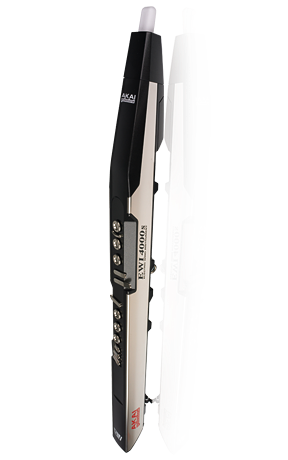
Once Upon A Time…..there was a great site called EWI-EVI.com. There was a wealth of information on wind controllers and stuff. That site now seems dead. In fact, there seems little movement right now in the whole EWI sphere. Akai seems to have stopped with the software updates (not that it needs it) but things like the Vyzex Editor seem to work OK on the latest version of OS X, but the software itself has not had an update in 5 years…….yikes!
There is a project called ewitool which looks very nice, but it only works on Windows and Linux…….no Mac. It seems to be a better editor than Vyzex is/was……and at least it is getting updated more frequently.
Some other sites that are EWI related or focused:
Saxophonist John Isley has a site called ewilogic.com which is an excellent source of using Logic and an Akai EWI together. Some amazing environments (think Michael Brecker’s Logic setup), tutorials and more. HIGHLY recommend you check it out.
The other site to check out is EWI Reason Sounds which Chris Vollstadt has put together. Simply put…..it is amazing. If you play EWI (USB or the 4000S) you will want to buy Reason to use with it. He has tons of patches he has made, tutorials, tips, tricks……basically everything. Hands down, it is probably the best EWI related site I have seen.
Sadly though, that is about it. If anyone knows of some other resources for EWIs please feel free to post about it.
UPDATE: Oh, seems I missed a couple. Thanks to Bret for the heads up. Check out his Windcontroller links for some additional ones.
How Much Longer Will ProTools Be Around?
From Wall Street PR:
Avid Technology is a company specializing in video and audio production technology, specifically digital non-linear editing (NLE) systems, management and distribution services. While Emmy and Oscar winners and nominees almost invariably use the company’s systems, sales seem to be a problem that Avid can’t cut out of the picture.
Avid now envisions revenue of $125 million to $127 million, and a GAAP loss of $17 million to $19 million. Previous Street consensus was for revenue of $145.2 million and a profit of 14 cents a share. This announcement shocked investors in early trading hours, as this Q3 revenue range included $4 million of revenue from divested businesses, while ongoing businesses had revenue of $121 million to $123 million versus $143 million a year ago.
Basically, Avid, you screwed yourself by continuing to sell ProTools for too much. And, you waited way to long to allow ProTools to work on NON Avid hardware. Thus, you pretty much shut yourself out of the prosumer/consumer market. People can by Reason, Logic, Ableton, Sonar, Reaper, Digital Performer, and a host of other programs for a fraction of what you want for ProTools. And existing users……you want $499 for me to upgrade? Forgetaboutit!
Building a Hackintosh for Music and Teaching Use
Last fall, I built a Hackintosh. “But why….Apple makes computers that are cheap right?” you say. Yes, they do. I was using a 2006 iMac for recording and driving two monitors for teaching (the other monitor is used to display music, smart music, etc). But, it had gotten slow. Real slow. I upgraded the drive, fresh OS installs. It didn’t help. The aging Core2Duo chip at 2 gigahertz just was not cutting it. Nor was being limited to 3 gigabytes of ram. The machine was fine for basic recording, but just was not cutting it anymore. Maybe cause I was spoiled at home having a 2008 MacPro.
So, I looked into getting a MacMini or another iMac for the studio. Except, I really liked having multiple drives in the case like my MacPro has. That computer is nearly silent. And fast. So, I had seen a couple of things on LifeHacker and other sites about building a Hackintosh. I originally was interested in a Hackintosh to power my Webserver (for Jazz-Sax) and to be used as a server for time machine backups and iTunes storage. But installing OS X on Atom CPUed computers seems a big issue after 10.5. Plus the little computer just wouldn’t perform as well.
Anyhow, after reading many of the posts there, I figured out that for a little less than $1K I could get a machine that performs about the same as my MacPro. Plus it could easily drive two monitors, and would have a ton of drive bays for storage.
So, threw caution to the wind, and bought the stuff to make the Hackintosh. It turns out it worked just fine. This was using 10.7 (Apple is now on 10.8). Dual monitors worked. Sound worked. Ethernet worked. Performance is as good if not better than my 2008 MacPro. USB Audio interface works fine. Logic runs flawlessly on it, as does Finale. Digital Performer 7.24 does not though, which is sad. I like Digital Performer. Supposedly getting a graphics card instead of using the built in HD3000 graphics would fix that problem. Maybe Digital Performer 8 doesn’t have this problem. I briefly used ProTools 10 as a trial to export projects I had done. Decided I didn’t want to play Avid’s huge upgrade price for ProTools to work on 10.7 (version 9 of ProTools did not work on it).
Things I have learned about running a hackintosh…..BACKUPS.
Generally, the Hackintosh is rock solid stable. I think I can count on one hand how many of unexplained crashes I have had on it in a year. And most all of them were on 10.7. Moving to 10.8 made things even more stable. BUT…..system updates are a crap shoot. Anytime Apple releases a system update for OS X, be it a security update or a .X version of the OS, you need to be careful. The update from 10.8.1 to 10.8.2 fried my Hackintosh. Resulted in it not booting. This is where you need to have a backup plan.
Since I wanted near Zero downtime, I decided to do a clone of my system drive to another drive. Then, if I do a system update, and it fails to boot, I can reboot into the clone drive and at least get through the day. Failing that, you can use the Unibeast USB drive you make when making a Hackintosh and simply reinstall the OS. Generally, ever single program you had installed and it’s data will be fine and you won’t lose anything. I’m going to say it’s a sure thing, but I had such a huge issue with 10.8.1 to 10.8.2 I ended up having to reinstall the OS several times on my main drive and I did not need to reinstall a single program. Logic 9 worked, Finale, SmartMusic, Sibelius…..no problems.
Second thing I learned…….get the hardware parts right.
On the TonyMacX86 there is a recommended build list of boards, chips, etc. Get one of those. Don’t think that you can get something similar, or close. Get what other people have successfully built a Hackintosh system with. I chose a Gigabyte GA-Z68X-UD3H-B3 board. It offered enough video ports and other ports for me. There are plenty of other choices, but pick something they recommend there. I can’t tell you how many people get some no name board or pre-made computer and want help getting OS X on it. Running and building a Hackintosh is not for the faint of heart, but do yourself a huge favor and start off on the right foot. The choice of board is essential. The chip, memory, case, power supply…..not as essential.
Final Thoughts
I saved a TON of money building this. A MacPro is a great machine. I have one. But as of right now, Apple is sort of letting the line of computers languish. For those of us who want a ton of storage in the case, and the ability to have a ton of ram……a MacPro is the way to go. I would totally build another Hackintosh. In fact, probably a year from now I will depending if the current one gets slow (I don’t see this happening) or if there are Thunderbolt audio interfaces that seem to warrant me getting (probably not). If you are a little tech savvy, or are a quick study, you can easily get yourself a MacPro at a third the price with a little elbow grease.
Looking for the Best Indexer of PDFs and Documents
I’ve been doing a project for several years now…..converting paper material to digital. I wrote about this a while ago, and the process still holds true for me. Since getting an iPad, and also since basically converting my teaching studio to being centered around electronic display.
So, in the process of going all “Digital”, you need to have some sort of “backup” plan. For years, I have been running a Infrant/Netgear NV+ to hold all my iTunes music and books. It worked great for many many years, but it is slow. It’s like 6 years+ old now. I recently purchased a Synology DS1512+ to replace it (the Netgear unit is now a RSync clone of the Synology that is stored off site). It works well. iTunes runs great on it and things are safe (RAID5). BUT….iTunes isn’t very good at all for managing PDFs.
Most everything I have is text searchable PDFs. Or text files. What I am looking for is a program to program like DevonThink that can keep track of all the PDFs and stuff, and you can search for text in the PDFs. BUT….I don’t want all the PDFs mashed into a single library file. Why? Cause I like having a play-along in iTunes that also has the book in a Playlist. If I had DevonThink handle all the PDFs, it would put them all into a Library file and I’d lose that ability.
I’ve looked into Yep, and that would be AWESOME for PDFs…..except it only works with Spotlight enabled drives. All the PDFs would have to be stored locally. Kinda defeats the purpose of having a NAS and RAID5. The other contender is iDocument, which is probably going to fit the bill. It is flexible in how it handles the PDFs, and doesn’t require you to keep them all in a single Library file (though you can), and doesn’t only work with a Spotlight drive.
Anyhow, it’s not a perfect solution, but it is getting there. Ideally, I’d love something like Evernote but that you can run locally without any of their limits in file sizes or bandwidth. Maybe Synology will come up with something for their units. They already have iOS/Android Apps that allow you to stream music or video from your NAS WHEREVER you are (home, on the go). It’s pretty darn cool. If they come up with something similar to Evernote for their Synology line…..that would be amazing.
BandMaster
Seems Samsung is not the only company that copies others. PGMusic’s Band-in-a-Box is clearly the target of BandMaster‘s photocopier.
BandMaster is $29 accompaniment software solution for Mac. No idea how it sounds (no videos or audio available), but it does have some minor interface improvements compared to Band in a Box (i.e.: Time Line).
With no audio or video, I’d be a little concerned about how this program is going to sound. Band in a Box is STILL the leader in the sort of program, and still my hands down “GET IT” choice.
Clinton On Music Education
So Bill is out in Canada yesterday. So how come he says this in CANADA rather than in the USA???
Avid Sells Off Most Of Its Product Lines/MakeMusic in the Tank as well.
So, this was making the rounds a couple of weeks ago.
Avid has agreed to sell its consumer audio and video product lines. The company’s consumer audio products are being sold to inMusic, the parent company of Akai Professional, Alesis and Numark, among others.
Basically, Avid is in trouble. It hasn’t made any headway in the consumer or prosumer markets. Why? Look at the ridiculous prices it charges for upgrades or for a first time ProTools. $699 for a first time purchase, $299 for users of ProTools 9, and previous versions of ProTools it’s $399. Logic 9 is $199. Does what ProTools does. M-Audio hardware also, for years, suffered stupid limitations. For years they had a Pro-Tools M-Powered that would only run on M-Audio hardware, but the LE version would run on Digidesign hardware, but if you had both hardware, you had to have two versions of ProTools to use them, and you couldn’t use them together. Companies like MOTU didn’t have this problem, you could use many of their interfaces together in Digital Performer. No problem. MOTU still makes interfaces that consistently win awards. M-Audio or Avid? No so much.
Avid should have dropped the price for ProTools to $299 for new purchases of ProTools 10. Sure, make the HD version a little more expensive, but not much more. But $699? Digital Performer is $499. Maybe that would be a better comparison for entry price. Avid made some steps forward by NOT requiring ProTools to have to use certain hardware, but the price seems to be the barrier right now. I know more guys using Logic 9 now than ProTools simply because you can get it for $199 in the App Store and it just works. Simple, cheap, and produces stuff that sounds great.
Avid is also supposedly gutting the whole Sibelius team as well. I hear rumors that the London offices are being closed. Sibelius is a property that Avid is keeping, not selling. Not sure what this means for the future of Sibelius. They used to be a company that was just up the street in Walnut Creek California. Now…..who knows.
AND……now MakeMusic (makers of Finale and SmartMusic) is having issues. Someone wants to buy them out. There is a good article about possible reasons and stuff here.
For me, I think MakeMusic needs to do two things right now. It needs an iPad version of SmartMusic. And it needs to allow printing of music from SmartMusic. The first point is self explanatory. Let me elaborate on the second.
Printing music from SmartMusic. It is something that they haven’t allowed at all. They used to allow printing of public domain or the stuff people generated from SmartMusic. But the last few versions I believe they removed that. SmartMusic is not only a great practice tool, but also a publishing tool. What other thing on the net would allow you to hear, and SEE every part of a piece you wanted to buy for your band? There isn’t. SmartMusic could be enabled to allow the purchase of music and the subsequent printing of the music. So, if the band director wanted his band to play “Childrens March” and have them work on it with SmartMusic, the process would be simple. Band teacher loads up SmartMusic, finds the version of the song he likes, buys it, prints it, done. The printing I think should be UNLIMITED but they should have some sort of tag or code on the page to know who’s printed version this is. Something like a school code or director id or something on every page. Most online printing services, like MusicNotes.com, allow TWO prints per purchase. That is stupid. For a band teacher, you’d need unlimited prints. Kids lose stuff, damage stuff, etc. Plus, SmartMusic could now be a digital LOCKER for the music. Teachers wouldn’t have to store scores anymore.
Heck, you could go even so far as say the director has 20 songs that are in SmartMusic. But they don’t want to repurchase all of them. What should they do? MakeMusic would have a program for say $10 per piece you could send the score and parts BACK to MakeMusic, they would verify you own the piece, then they would give you access to the piece on SmartMusic. And then they would either recycle the paper or send it back. Or maybe they could verify it via purchase orders. I dunno. Something.
The additional angle on this is that somewhere in the future, classrooms are going to be paperless. Or mostly paperless. MakeMusic could tout that they are future proofing music programs. I think this would make a lot of sense, and is do-able in the next year…..depending on the publishers.
Interesting times. I don’t know what the future holds, but MakeMusic and Avid have a lot of work to do to remain viable products.
Really? Coming Soon….?
I think this is a REAL product coming from Bari Woodwinds. Um…..interesting I guess….though why you’d want this…..I have no clue.

Bob Berg Lecture at CSUH 02/07/1996
i have this project going on where i am digitizing old cassette tapes. I have 3 tape decks (soon to be 4) plugged into my audio interface and Logic is recording them playing back at the same time.
anyhow, here is one of the things i came across is a recording of Bob Berg speaking at Cal State Hayward in 1996. Enjoy.
 Bob Berg at CSUH 02/07/1994 (110.0 MiB, 47 hits)
You do not have permission to download this file. Go register first.
Classic Jazz Music Stations – USA
Came across this. There are several streaming radio stations that do jazz. Good stuff. Click the source link for more stations.
Classic Jazz Music Stations – USA:
Here are around 30 of the best full time “Classic Jazz” radio stations in the USA. They are broadcasting “live” from various locales across the country. All these stations have been very carefully selected based the on quantity and quality of the jazz they play. Just click on the station’s name and it you will go directly to the music. Enjoy…
************************************************************************

(Via Jazz Radio Online)