*sigh*
Damn it…..

Jazz-Sax, all things Jazz and Sax
*sigh*
Damn it…..
From the NY Times:
“A pencil is a little wonder-wand: a stick of wood that traces the tiniest motions of your hand as it moves across a surface. I am using one now, making weird little loops and slashes to write these words. As a tool, it is admirably sensitive. The lines it makes can be fat or thin, screams or whispers, blocks of concrete or blades of grass, all depending on changes of pressure so subtle that we would hardly notice them in any other context. (The difference in force between a bold line and nothing at all would hardly tip a domino.) And while a pencil is sophisticated enough to track every gradation of the human hand, it is also simple enough for a toddler to use.”
As a musician, I’ve used countless pencils to mark up music. To take notes. To write music. It’s basically part of your musicians toolbox.
One of the sites in my RSS feeder thing (powered by NewsBlur) is Adafruit. They had this article up and an accompanying video tell the story.
From Gizmodo
Spotify has been hit with a huge copyright lawsuit that alleges the music streaming company “failed to pay songwriter royalties to a publishing company approximately 21 percent of the time,” according to the complaint. Wixen Music Publishing filed the $1.6 billion lawsuit against Spotify on December 29th. The music licensing company says it represents Tom Petty, Rage Against the Machine, Missy Elliott, Neil Young, Weezer, and the Beach Boys, among other artists.
Honestly, ABOUT TIME. These companies make TONS of money off of things they do not make. Artists would be better off just putting stuff on Youtube with Ads than on Spotify.
Do you have a musician whom you want to get a gift for? Or perhaps thinking about treating yourself this holiday season? Here are some ideas of books to get that musician for the holidays.
Anyone else have any recommendations?
Bobby Owsinski linked to a interesting study,
The study found “a slight superiority of musicians over non-musicians” in long-term memory tasks, and a larger one in both short-term and working-memory tasks. Musicians performed best on working-memory tasks involving “tonal stimuli,” as you would expect, but their “advantage extended to verbal stimuli, too.” And on short-term memory tasks, musicians showed superior skills whether the item they were asked to recall was a musical tone, a verbal instruction, or a visual image.
Duh….
Pedal Board 1.1
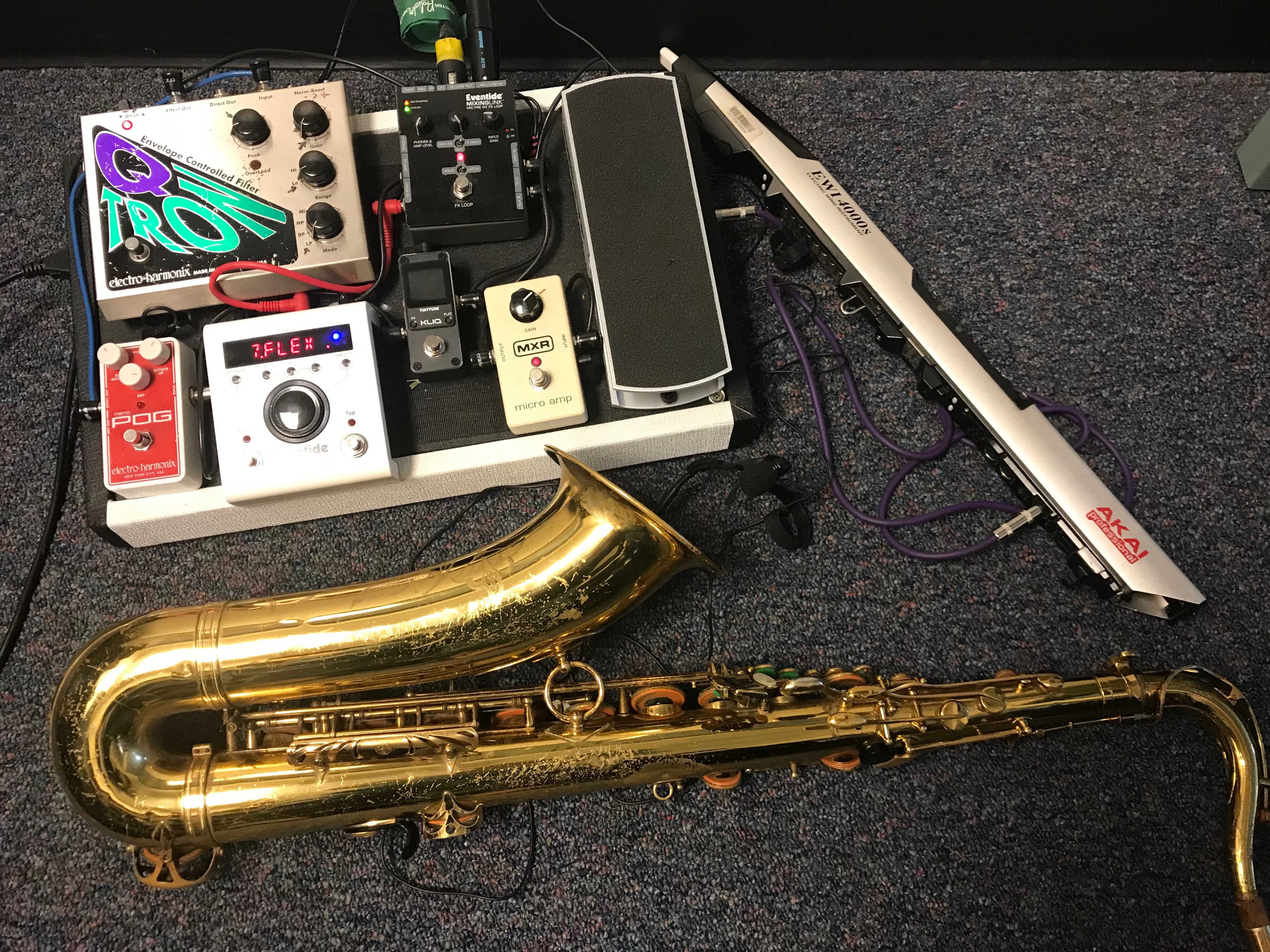
This is a dual input, one output rig. Basically, I wanted a rig where I could do both Saxophone and EWI and run it through effects. Lets look at the signal flow.
EWI – The input starts by going into the MX Micro Amp. Then goes into the volume pedal. Why? In live performance, sound guys tend sometime not to pay attention. That lead to performances with the EWI not being heard. Having the Amp and the Volume pedal lets me control the volume. I can boost it, or lower it. The signal then goes into the Eventide MixingLink. The mixing link then can send it to the effects loop.
Sax – The input starts by going into the Eventide MixingLink. Great little box that has nice preamps, and allows you to send things to an effects loop, or not, or send things to the effects loop and mix in some of the sax (or EWI) sound. It’s pretty flexible.
Effects Loop Signal flow
Then everything comes back to the Eventide Missing link. I have the Missing Link set in DI mode (not line level).
And that is the pedal board as of today. It’s been working well.
Latest from Taylor Swift
Look At What You Made Me Do for Eb Instruments by Taylor Swift (135.4 KiB, 16 hits)
You do not have permission to download this file. Go register first.
Look At What You Made Me Do for Bb Instruments by Taylor Swift (134.7 KiB, 11 hits)
You do not have permission to download this file. Go register first.
No more dealing with Conductors!
This is my current pedal board, minus the Q-Tron (which was in the upper left corner of the board).

This board was designed for using an EWI and a Microphone input at the same time. One issue I have found performing is that sound people are usually very inconsistent. They are either the set it once and they leave type, or the not playing attention type. Hardly does one get a sound guy who’s actually doing their job. My biggest problem was that a LOT of sound guys
The Woodwind and the Brasswind has some lightly educational videos about playing saxophone with effects pedals. They seems a little more geared towards them selling stuff. Not the greatest videos or examples, but it is a thing that saxophone players are using in performance. One of the best examples of someone who uses pedals is Dean Mongerio.
I think the one they did not show is an envelope follower, like a Q-Tron. If you are into the Brecker sound from the 70s, you want a Q-Tron type pedal. I’m planning on doing an article about pedals soon. I have been doing playing with pedals off and on for a while, starting with a Digitech Vocalist Live. I’ve now gone more “traditional”. What I would say is that I’m not a huge fan of using an all in one box to do effects for various reasons.
Anyhow, if anyone has any good videos with effects pedals, submit them in the comments!
I heard about this a while ago. A way to “augment” one’s bass clarinet. Though the original looked like it would completely wreck one’s bass clarinet.
I mean, look at all the stuff bolted on it. No way. Plus those demos? I dunno about that contemporary music stuff…..very strange.
Now though, they have the sensor down to a little box that straps on your clarinet or saxophone. Gives you all sorts of possibilities. No idea how much it costs.
I do a LOT of scripting. From writing Bash shell scripts, to Python code to AppleScripts, I do a lot of coding. It makes life easier. Why reinvent the wheel when you can script it once and be done with it.
Anyhow, since about 2011, I’ve been formatting things for use on an iPad. One thing you can do to get your printed things out of Finale on to an iPad easy is to format the page for an iPad. Sadly, there is no “default page setting for iPad” thing in Finale. However, with a little bit of FinaleScript-ing, you can format things for an iPad. Here is my script

This script basically sets your top page at .5″, left and right to 0.10069 and then the bottom to .12153. These are sorta the settings I found that look good on an iPad. I leave just a little bit of boarder “whiteness”.
The script can be fired off by doing a Ctrl + Opt + Shift + I, or from the FinaleScript menu.
Enjoy!
Seems Yamaha has a new instrument out. Looks rather…..interesting?